



I opened Old Navy: Fashion at a Value! with a simple shopping problem in mind: I wanted to browse clothing without starting from a crowded marketplace filled with unrelated sellers and endless duplicate listings. This is Old Navy’s dedicated shopping app, developed by Gap Official, and it focuses on apparel for women, men, and children. My experience was less about discovering a complicated tool and more about moving from “I need something to wear” to a more focused store visit on my phone.
The app is free and rated for Everyone, which makes it easy to try without committing money to the download. It has built a sizeable audience too, with more than a million installs, an average rating of 4.8, and roughly 133 thousand ratings. Those figures suggest that the app is not a niche experiment, although they do not replace the more useful question: does it make your particular shopping routine easier?
From a vague clothing need to a practical order
Starting with the right shopping intention
The strongest way to use this app is to begin with a clear purpose. “I need clothes” is too broad, even inside a retailer dedicated to fashion. “I need jeans for everyday wear,” “I need children’s basics,” or “I want a dress for an upcoming event” gives the browsing session direction. I found that this matters because the app is most useful when I treat it as a digital version of a familiar store, not as an inspiration feed that will automatically decide my wardrobe.
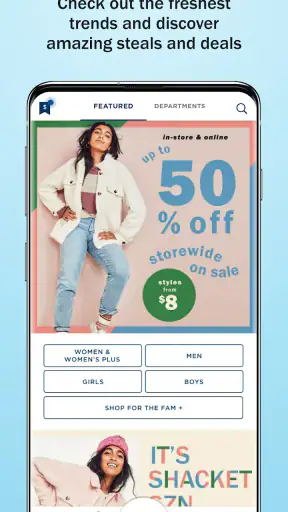
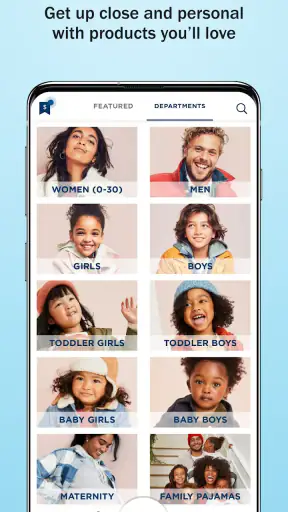
Old Navy covers several parts of a household’s clothing needs in one place. I can move between women’s apparel, men’s clothing, kids’ fashion, dresses, denim, and everyday pieces without switching to another retailer. That makes it especially appealing when one shopping trip involves several people. A parent preparing for a school season, for example, can look for children’s items and then continue to adult clothing instead of opening separate shopping apps.
There is also a useful distinction between this app and a general marketplace. On a marketplace, I usually compare many brands, sellers, shipping approaches, and product standards. Here, the range is narrower because the experience is centered on Old Navy. That reduces the noise, but it also means the app is not the right first stop when I want to compare many competing labels or search for a very specific specialist garment.
Turning browsing into a manageable search
My preferred workflow is to choose a department first, then narrow the session around the type of item I actually need. I avoid adding things immediately just because they look appealing. Instead, I compare similar pieces in the same browsing session, paying attention to fabric information, available sizes, color choices, and the overall cut shown in the product presentation. This small pause prevents the cart from becoming a collection of attractive but impractical possibilities.
A useful habit is to shop by outfit rather than by isolated item. If I am considering a pair of jeans, I think about the tops and shoes already in my wardrobe. If I am looking at children’s clothing, I consider whether the item works for school, play, or a more formal occasion. The app can display the retailer’s range efficiently, but it cannot know what is already in my closet. The quality of the final decision still depends on the questions I ask while browsing.
The most valuable time-saving trick is to decide the purpose of the purchase before opening the catalog. That sounds obvious, but it changes the whole flow. I spend less time scrolling, compare fewer irrelevant items, and reach the cart with a clearer reason for every selection.
Checking the details before the cart
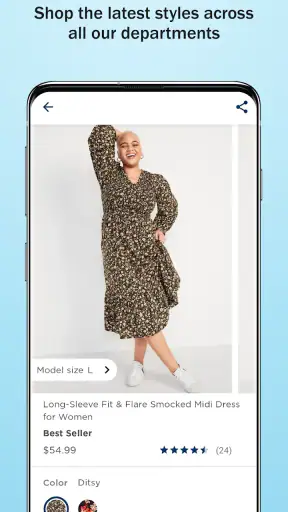
Clothing shopping on a phone has one unavoidable weakness: a screen cannot reproduce the feel, weight, stretch, or exact color of fabric perfectly. I therefore treat product images as useful evidence, not a complete inspection. I look closely at the displayed garment, read the available description, and check the size options before becoming attached to an item. If the fit is especially important, such as with jeans or a fitted dress, I am more cautious than I would be with a relaxed shirt.
This is where the app’s single-brand focus helps and limits me at the same time. It is easier to learn how a familiar retailer’s sizing and styling tend to work because the catalog has a consistent identity. However, I cannot assume that every cut will suit me equally. A shopper who already knows their preferred Old Navy sizes may move quickly; someone trying the brand for the first time should leave room for uncertainty and avoid building an entire order around one untested fit.
I also recommend separating “good value” from “lowest possible cost.” The store’s identity is connected with accessible fashion, but a low-cost item is only useful if it fits the intended occasion and survives the amount of wear I expect. I ask myself whether I am buying a dependable basic, a seasonal experiment, or something for a single event. That simple classification makes the final cart more sensible.
Building the cart without losing control
Once I have compared the candidates, I add only the items that solve the original problem. This is particularly important in a fashion app because browsing naturally encourages impulse additions. A second color may be worthwhile when the first item is a reliable staple, but several near-identical pieces can turn a focused purchase into an uncertain one.
Before moving on, I review the cart as an outfit and as a budget decision. I check whether the chosen sizes are still the ones I intended, whether each item belongs to the same shopping purpose, and whether I would still buy it if I had seen it on a rack rather than on a phone. That last question is surprisingly effective at removing items that were added only because they appeared during a long scroll.
For a family order, I would go one step further and group the cart mentally by person. Mixing adult and children’s items can make the total easier to misread, especially when the purchase has several purposes. A quick review by wearer and occasion gives me a clearer handoff to the checkout stage.
The handoff from app to real-world decision
The shopping process does not end when I find an item. The app hands the decision back to me: I still need to judge fit, timing, usefulness, and whether online convenience is worth giving up the chance to inspect clothing in person. This is the point where I compare the app with the usual alternatives.
A physical Old Navy store is better when I need to feel fabric, compare several sizes immediately, or make a same-day choice. The app is better when I already know the kind of item I want, prefer browsing privately, or need to assemble several categories without walking through a store. A general fashion marketplace is better for brand comparison and unusual labels, while this app is more efficient when I have already decided that Old Navy is the retailer I want.
That distinction keeps my expectations realistic. I do not use the app to answer every fashion question. I use it to reduce the effort between a clothing need and a considered Old Navy purchase.
What the finished result feels like
The outcome I value most is a shorter path from intention to a coherent cart. Instead of opening a broad search and sorting through unrelated sellers, I can stay within one retailer’s clothing range and make decisions around departments, wearers, and occasions. For everyday basics or a coordinated family shopping session, that focus feels practical.
Imagine a realistic Saturday morning: I realize that a child needs several school-ready pieces, I need a casual top, and my partner wants to replace worn everyday clothing. Rather than making three separate online searches, I can use one store app, switch between the relevant sections, compare the items, and review the whole purchase together. The benefit is not that the app magically finds the perfect wardrobe; it is that the handoff between those related needs is less fragmented.
For a solo shopper, the result can be even simpler. I might open the app looking for denim, compare a few options, remove the pieces that do not fit my planned wardrobe, and finish with one or two useful choices. That is a better result than filling a cart with novelty items that looked appealing only during browsing.
The app’s public reception supports the impression that many shoppers find this focused approach worthwhile. It has around 6.7 thousand written reviews alongside its much larger pool of ratings, and the current version is 18.5.0. I regard those figures as signs of an active, established shopping experience rather than a guarantee that every device or shopping session will feel perfect.
Where the flow breaks down
The first point of friction is the basic limitation of buying clothing remotely. Images and descriptions help, but they cannot fully settle questions of texture, drape, stretch, or personal fit. If I am between sizes, unfamiliar with a particular cut, or shopping for an important occasion, the app may not give me enough confidence to replace an in-person try-on.
The second issue is decision fatigue. A dedicated retailer’s catalog is less chaotic than a marketplace, but it can still contain many similar garments. Without a shopping goal, I can spend too long comparing minor differences in color or styling. The app does not solve indecision by itself; it works best when I arrive with a short list of requirements.
There is also a trade-off in the single-retailer model. I appreciate not having to evaluate multiple sellers, but I lose the convenience of comparing Old Navy’s item directly with equivalent products from other brands in the same screen. Someone who is highly price-sensitive, searching for premium materials, or looking for a specialist outdoor or formalwear label may be better served by a broader shopping service.
Another practical limitation is that mobile shopping requires careful attention at the final review. Small screens encourage quick taps, and a rushed shopper can overlook a size choice or add an item for the wrong member of the household. My solution is simple: I treat the cart as a separate stage, not as an automatic consequence of browsing. I review every item once with the original shopping goal in mind.
People who should skip this app are those who dislike shopping within one brand, need immediate physical inspection, or want a broad comparison across retailers before deciding. It is also not my first choice when I need expert advice about technical clothing or a highly specific fit. In those situations, a specialist store or an in-person visit gives me more useful information.
Who will get the most from it
I would recommend the app to shoppers who already enjoy Old Navy’s style and want a convenient way to browse its clothing categories. It suits households especially well because women’s, men’s, and kids’ apparel can be considered within the same retailer’s environment. It is also a good match for people who prefer to shop at their own pace instead of moving through a busy store.
It works best for repeat customers who have some knowledge of their usual sizes and preferred silhouettes. They can spend less time guessing and more time comparing actual options. New customers can still use it, but I would begin with one low-risk item rather than attempting a complete wardrobe overhaul on the first session.
The app is available on supported mobile devices running iOS 11 or later, and its age classification is Everyone. It first appeared on March 17, 2021, so it is not a brand-new retail experiment. Those details matter mainly because they set practical expectations: compatibility should be checked before downloading, and the app belongs to an established mobile shopping routine rather than a temporary promotional tool.
My recommendation after following the full workflow
After using it as a complete path from clothing need to planned cart, I see Old Navy: Fashion at a Value! as a focused shopping companion rather than a universal fashion solution. Its main strength is the clean handoff from one household clothing need to another inside a single retailer. Its main weakness is the same thing: shoppers who want broad brand comparison or the certainty of a fitting room will eventually reach the limits of the mobile experience.
I like it most when I know roughly what I want, need to shop for more than one person, or want to revisit a familiar retailer without making a trip. I would be more cautious when fit, fabric, or a special occasion matters more than convenience. Used with a clear list, a deliberate product check, and a final cart review, it can make everyday apparel shopping feel organized instead of overwhelming.
My honest recommendation is to try it if Old Navy is already one of your go-to clothing stores, but use it as a decision aid rather than a substitute for judgment. The free download makes that experiment easy, and the app earns its place when it turns a scattered clothing errand into one manageable workflow.


